
Clips 01
Download manualConnect
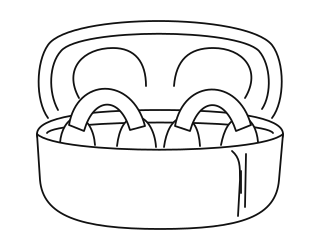
- Open the case.
- Turn on Bluetooth.
- Choose “Kati Clips.”
Control
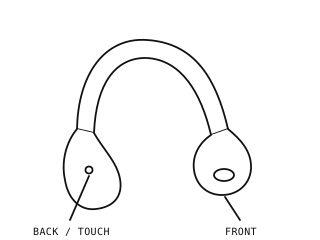
Touch the longer bean behind your ear.
| Play / pause | Double-tap |
| Answer / end call | Double-tap |
| Decline call | Hold 2 seconds |
| Voice assistant | Hold 2 seconds; release at the tone |
Tracks & power
| Previous track | Triple-tap the earbud assigned to the left channel. |
| Next track | Triple-tap the earbud assigned to the right channel. |
| Turn on manually | Touch and hold either earbud for 2 seconds. Opening the case also turns the earbuds on. |
| Turn off manually | Touch and hold either earbud for 5 seconds. Placing the earbuds in the case and closing the lid also turns them off. |
Wear
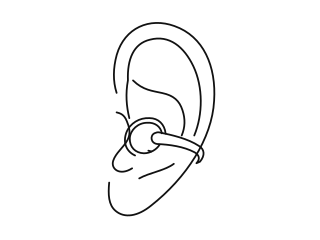
Small bead in front. Longer bean behind.
Adjust gently for comfort.
Left & right
Either Clip fits either case slot. Close and reopen the lid to assign left and right channels. You can also use one Clip on its own.
Charge
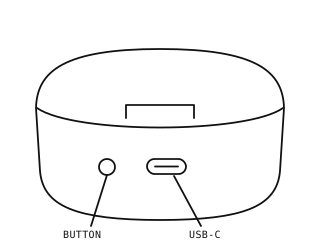
- Put Clips in the case and close it.
- Connect the supplied USB-C cable.
- Use a 5 V, 1 A supply. No fast chargers.
Lights & battery
Earbuds charging: case light stays white, then turns off when full. Clips disconnect from your device while charging.
Case charging: white lights flash; each represents one third of the battery. All three stay on when full.
Low battery: the earbuds sound a prompt every five minutes; the case light flashes.
With the lid closed and Clips charging, press the case button to turn the lights off or on.
Help
Kati Clips does not appear in Bluetooth settings
Keep the earbuds near your device. Open the case, check that the earbuds have power, and turn Bluetooth off and on again. If needed, clear the pairing list below and reconnect.
Clear the pairing list
Place both earbuds in the case and leave the lid open. Hold the case button for 6 seconds until the white light flashes quickly. Remove the old Kati Clips entry from your device’s Bluetooth settings if necessary, then pair again.
Restore the earbud settings
Tap an earbud’s touch area six times to restore the factory settings. Reconnect the earbuds afterward.
An earbud is not responding
Place both earbuds in the case for 15 seconds. Remove the saved Kati Clips Bluetooth connection from your device, then reopen the case and reconnect. If the issue continues, stop using the product and contact your seller.
An earbud will not charge
Check that the case has power. Wipe the earbuds’ contacts and the case’s charging pins with a soft, dry cloth, then reseat the earbuds. Keep liquid away from the contacts.
Audio cuts out
Move closer to your device and away from strong sources of electromagnetic interference. Walls, distance and the surrounding environment can affect the Bluetooth connection.
Specs
| Product | Kati Clips |
| Earbuds | KT1001 |
| Charging case | KC1001 |
| Bluetooth | 6.0 + EDR |
| Earbud battery | 30 mAh each |
| Case battery | 400 mAh |
| Rated input | 5 V DC, 1 A |
| Charging port | USB-C |
| Case battery voltage | 3.7 V DC |
In the box
Two earbuds, charging case, charging cable and user manual.
Safety & FCC
- Keep the earbuds and case dry. Do not immerse them in water or use them after soaking.
- Avoid dust, oil fumes, direct sunlight, high heat and thunderstorms.
- Clean with a soft, dry cloth. Do not use solvents or harsh cleaning products.
- Keep charging contacts clean so the earbuds can charge properly.
- Use the supplied charging cable and a 5 V USB power supply. Do not use fast-charging equipment.
- Listen at a comfortable volume. Prolonged high-volume listening can damage your hearing. Do not use the earbuds while driving or cycling.
- If storing the product for a long time, fully charge it first and recharge it monthly.
- Do not crush, heat or burn the product.
Built-in battery warning
The product contains built-in, non-removable rechargeable batteries. Do not disassemble, modify or attempt to replace the batteries. Battery replacement must be performed by a manufacturer-authorized service center. Using an incorrect battery or attempting an unauthorized repair may cause fire or explosion.
FCC notice
Warning: Changes or modifications to this unit not expressly approved by the party responsible for compliance could void the user’s authority to operate the equipment. This device complies with Part 15 of the FCC Rules. Operation is subject to the following two conditions: (1) this device may not cause harmful interference, and (2) this device must accept any interference received, including interference that may cause undesired operation.